Baggie Font Review
As a web designer, I’m always on the lookout for fonts that bring personality to a site without sacrificing usability. Baggie is one of those rare finds—a handwritten script that feels both playful and professional. I recently tested it on a new client’s portfolio site, and it quickly became a favorite for its charm and versatility.
First Impressions: A Handwritten Touch for Digital Spaces
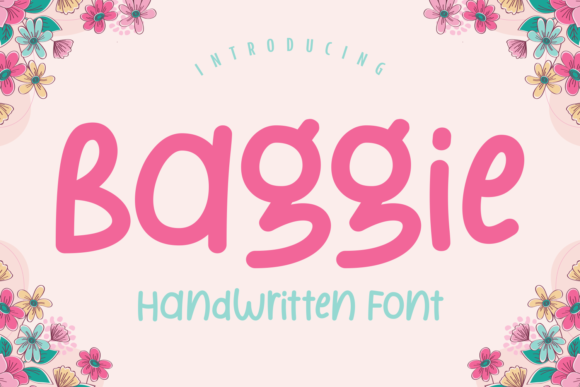
Baggie has this warm, hand-drawn quality that feels like it was written with a pen on a scrap of paper. It’s not too ornate, but it has just enough flair to stand out. I first used it in a hero section where the client wanted a personal touch. The font added a sense of authenticity that a standard sans serif wouldn’t have provided. It felt like a friendly greeting from the brand itself.
The font works especially well when paired with clean, modern design elements. On a light background, it’s easy to read, and on dark backgrounds, it still holds up without looking washed out. I found that using it for headings and subheadings made the site feel more approachable and creative.
Using Baggie in Web Layouts: Hero Sections and Call-to-Action Buttons
I experimented with Baggie in a few different layout scenarios. In a hero section, it made the headline pop without being overwhelming. The font’s natural variation gave each letter a slightly different shape, which made the text feel more dynamic. It worked great over an image banner, where the contrast helped the message stand out.
For call-to-action buttons, I used Baggie in a smaller size with a bold weight. It looked sharp and readable, even on mobile screens. The font didn’t lose its character at small sizes, which is a big plus for responsive design. I also tried it on a button overlaying a video background, and it still held its own without distracting from the content behind it.
Readability and Responsiveness: How Baggie Performs Across Devices
One of my main concerns when testing a decorative font is how it performs on different screen sizes. Baggie handled mobile devices well. At 16px, it was clear and legible, even on smaller screens. I noticed that the font’s swashes and ligatures didn’t interfere with readability, which is important for user experience.
On desktop, the font looked even better. I used it in a header with a background image, and it maintained its visual appeal without becoming hard to read. The font’s spacing was consistent, which helped with line breaks and paragraph flow. For a website that prioritizes aesthetics and usability, Baggie is a solid choice.
Font Pairing: Balancing Style with Functionality
While Baggie is great on its own, it really shines when paired with a simple, clean font. I used it alongside a sans serif for body copy, and the contrast was perfect. The script font added character to headings, while the sans serif kept the rest of the site easy to scan.
For a more editorial look, I paired Baggie with a serif font. This combination gave the site a vintage, handcrafted feel that worked well for a boutique online store. It also helped create a strong visual hierarchy, making it easier for users to navigate the site.
When Baggie Isn’t the Right Fit
Like any display font, Baggie isn’t ideal for every use case. I found that it wasn’t suitable for long paragraphs or dense text blocks. If you’re designing a site with a lot of body content, it’s best to stick with a more traditional font for readability.
It also doesn’t work well for small navigation items or form labels. In those cases, the font can become too difficult to read, especially on lower-resolution screens. For accessibility-focused projects, it’s better to choose a more neutral typeface.
Final Thoughts: A Fun, Functional Choice for Creative Sites
Overall, Baggie is a great addition to any web designer’s toolkit. It brings a sense of warmth and creativity that can elevate a site’s visual identity. Whether you're working on a portfolio, a product landing page, or a digital brand kit, Baggie offers a unique blend of style and practicality.
Its versatility makes it a good fit for a wide range of projects, as long as you keep its limitations in mind. With the right pairing and careful use, Baggie can help your site stand out while maintaining a professional appearance.